Can Claude make Google Slides and Docs? What it does well, and when you need SourceToDocs
Since October 2026 Claude can create and edit Google Slides, Docs and Sheets. Here is what the Google Workspace add-on and connectors actually do, where they stop, and when a template-driven generator like SourceToDocs is the better tool. Or both together, over MCP.
Yes, Claude can make Google Slides and Docs. Since 6 October 2026 it works inside Docs, Sheets and Slides through a sidebar add-on, and from a Claude chat through Google connectors, both in beta on paid plans. It is excellent for one deck or one document you are working on. It is not built to fill the same template from 200 rows of data every month. That job is what SourceToDocs does, and the two work together.
Until this autumn the honest answer to “can Claude make Google Slides” was “sort of”: Claude could write the content, or produce a .pptx file you then imported. That changed with Anthropic’s launch of Claude for Google Workspace, which is why searches for Claude with Slides and Docs went from almost nothing to a few thousand a month. This post covers what the launch actually does, where it stops, and how to decide between it and a template-driven generator. We make one of those, so we have tried to be precise about the parts Claude does better.
What Claude can do in Google Slides and Docs today
There are two ways in, and they suit different work.
| Claude for Google Workspace (sidebar) | Google connectors (from a Claude chat) | |
|---|---|---|
| Where you work | Inside the open Doc, Sheet or Slides file, Extensions › Claude | In Claude, by pasting a file link or asking for a new file |
| Best for | Editing the file in front of you | A new file, or work that spans several files |
| Slides | Builds new slides from the deck’s layouts and theme, edits what you select, flags overlapping or unreadable text | Creates a deck or edits one you link |
| Docs | Drafts from scratch, rewrites sections, restyles headings in place, bigger edits as suggestion cards | Creates a document or edits one you link |
| Sheets | Formulas, pivot tables, native charts, new tabs | Creates or edits a sheet |
| Control | ”Ask before edits” (approve each change) or “Accept all edits” | Same permissions as your Google account |
| Availability | Public beta, paid Claude plans | Beta; Team and Enterprise owners enable it first |
Sources: Anthropic’s launch article and product page, and 9to5Google’s coverage, all from October 2026. Claude only reaches files your Google account can already open.
Two things in that table are genuinely new. First, Claude now builds slides from your deck’s own layouts and theme, so added slides match the rest of the deck instead of arriving in a generic style. Second, it edits in place: fixing one sentence or one heading without disturbing the formatting around it. Earlier guides that say Claude cannot edit an existing deck were written before the launch and are out of date.
Anthropic also lets you save a working process as a skill, so a team can build “the next QBR deck” the same way each time. That is useful for consistency between people. It is still a person starting a conversation and approving the output.
Where it stops
Anthropic’s materials describe a person working on a file, or a few files, with Claude. They don’t mention the things that turn a document into a pipeline:
- Filling one template per row of data. There is no “one deck per account in this table” setting. Airtable isn’t mentioned at all.
- Batch runs. Two hundred decks is two hundred pieces of a conversation, each one something to check.
- Schedules and triggers. Nothing runs on the first of the month, or when a record changes, without someone starting it.
- A locked design. Claude generates content, so what lands on each slide is a fresh decision every time. That is the point when you want ideas, and a risk when the client compares this month’s report with last month’s.
- Charts in Slides and PDF delivery. Charts are described for Sheets only, and PDF output isn’t mentioned.
None of that is a criticism of the feature; it is a different job. A model that writes is the right tool when the content needs judgement. A template filled from data is the right tool when the content is already in a system of record and the document has to look the same every time.
The two jobs, side by side
| Claude in Slides and Docs | SourceToDocs | |
|---|---|---|
| Input | Your instructions, the open file, files you link | Rows in Airtable, Google Sheets or a CSV |
| Output | Edits to one file, or a new file | One Google Slides deck, Google Doc or PDF per row, or per group of rows |
| Design | Built from the deck’s layouts and theme, content chosen per run | Your template, unchanged except for the placeholders you marked |
| Repeat next month | Start a new conversation (a saved skill helps) | Run it again, or let the schedule run it |
| Volume | Comfortable for a handful of files | Hundreds of files in one run |
| A person in the loop | Yes, approving edits | Optional, to review the finished files |
| Best at | Drafting, rewriting, restructuring, one-off decks | Client reports, QBRs, proposals, certificates, anything recurring |
If your document is written once and read once, Claude is the faster tool and you probably don’t need us. If it is produced over and over from the same data, Claude can still help write the template, and SourceToDocs is what fills it.
What “one per row” looks like in SourceToDocs
The template is an ordinary Google Slides deck or Google Doc that your designer owns. Placeholders mark where values go; a loop marks a slide or a table row that repeats for each linked record. A run does this:
- 01
Choose the rows
An Airtable table or Google Sheet, filtered to the records this run covers: this quarter's accounts, this month's clients.
- 02
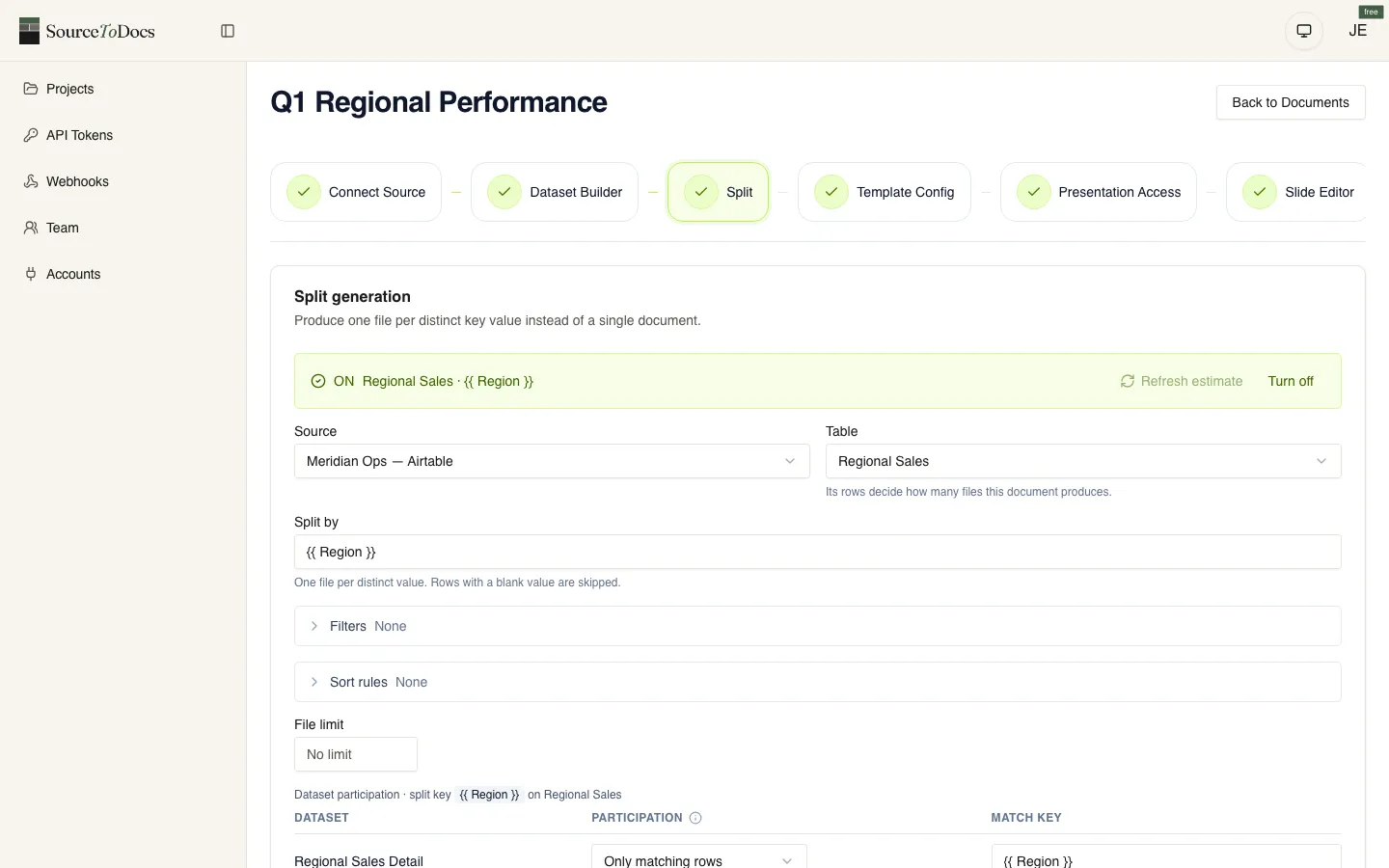
Split on a field
Every distinct value of the field you choose becomes its own file: one deck per account, one report per client.
- 03
Fill the template
Each placeholder gets that row's value; loops expand against linked records. Nothing else on the slide is touched.
- 04
Deliver
Files land in a Google Drive folder, with a PDF alongside if you switch it on. The run log says how many were made.
- 05
Repeat
Next month, run it again or let the schedule do it. Same template, new numbers.
Using both: Claude runs SourceToDocs over MCP
The choice isn’t either/or. SourceToDocs has an MCP server, so Claude Desktop, Claude Code or any other MCP client can sign in to your account and do the setup for you: create the project, connect the base, read its columns, map them to the template’s placeholders, set the split, preview, and start the run. The one thing it leaves to a person is editing the Slides or Docs file itself, which, since October, is exactly the part Claude for Google Workspace is good at.
So a realistic workflow is:
- Design the template in Google Slides, with Claude in the sidebar helping write and tidy the slides.
- Ask Claude, through the SourceToDocs MCP server, to “set up a QBR deck per account from this base and run it for Q4”.
- Each quarter after that, the run repeats from the data without anyone opening a chat.
Which one you need
- The same document goes out more than once a month, or to more than ten recipients.
- The numbers in it already live in Airtable, Google Sheets or a CSV export.
- The design is fixed by a brand or a client, and should not change between runs.
- Someone currently copies a deck, changes the name and pastes in new figures.
- It should run on a schedule, or from another tool, without a person starting it.
Two or more true: use a template-driven generator, with Claude helping on the template. None true: Claude in Slides and Docs is the simpler tool.
For the wider picture of prompt-based tools versus templates, see document automation vs AI deck generators. For the Airtable-specific build, the Airtable to Google Slides guide walks through a real setup.