Generate Google Slides, Docs and PDFs from n8n
An n8n verified node that adds document generation to any n8n workflow, on n8n Cloud or self-hosted. Pass it rows from a form, a schedule, a CRM or an AI step, and it builds branded Google Slides, Google Docs and PDFs from your template, then delivers them where you choose.
n8n is very good at moving data between systems. It is not built to lay that data out as a document someone would put in front of a client. The SourceToDocs node closes that gap: it is the step in an n8n workflow that turns rows into a finished Google Slides deck, Google Doc or PDF, built from a template your designer owns.
You keep n8n as the orchestrator. Triggers, branching, retries and credentials stay where they already are. SourceToDocs does the one job n8n’s own Google nodes make hard, which is n8n document generation from a branded template at the volume your workflow produces.
Why not n8n’s built-in Google Slides and Docs nodes
n8n ships Google Slides and Google Docs nodes, and for small edits they are the right tool. They are editing primitives, though, not a generator. The Google Slides node can create a presentation, read one, list its slides and replace text. The Google Docs node can create, read and update a document.
That works for swapping a client name into a fixed deck. It gets painful as soon as the document depends on how much data there is. How to append a slide to an existing deck is a recurring question on the n8n community forum, and the answer given is a raw HTTP call to the Google Slides API.
| What you need | Built-in Google nodes | SourceToDocs node |
|---|---|---|
| Start from a branded template | Copy the file with the Drive node, then replace text placeholder by placeholder | The template is the document; one Generate step |
| One deck per row, account or client | Loop the items and repeat copy-and-replace for each | Set up once in SourceToDocs; one run produces every file |
| A slide or section repeated per row, such as a 40-session agenda | Not supported by the node; needs HTTP requests to the Slides API | Handled by the template |
| PDF as well as Slides or Docs | A separate Drive export step | PDF is an output format of the same run |
| Land the file in a Drive folder | Another node to move or upload it | Chosen in Deliver To |
If your workflow fills in the same three fields on the same one-page deck, keep the native node. If the output is a real document that changes shape with the data, that is what this node is for.
What the node can do
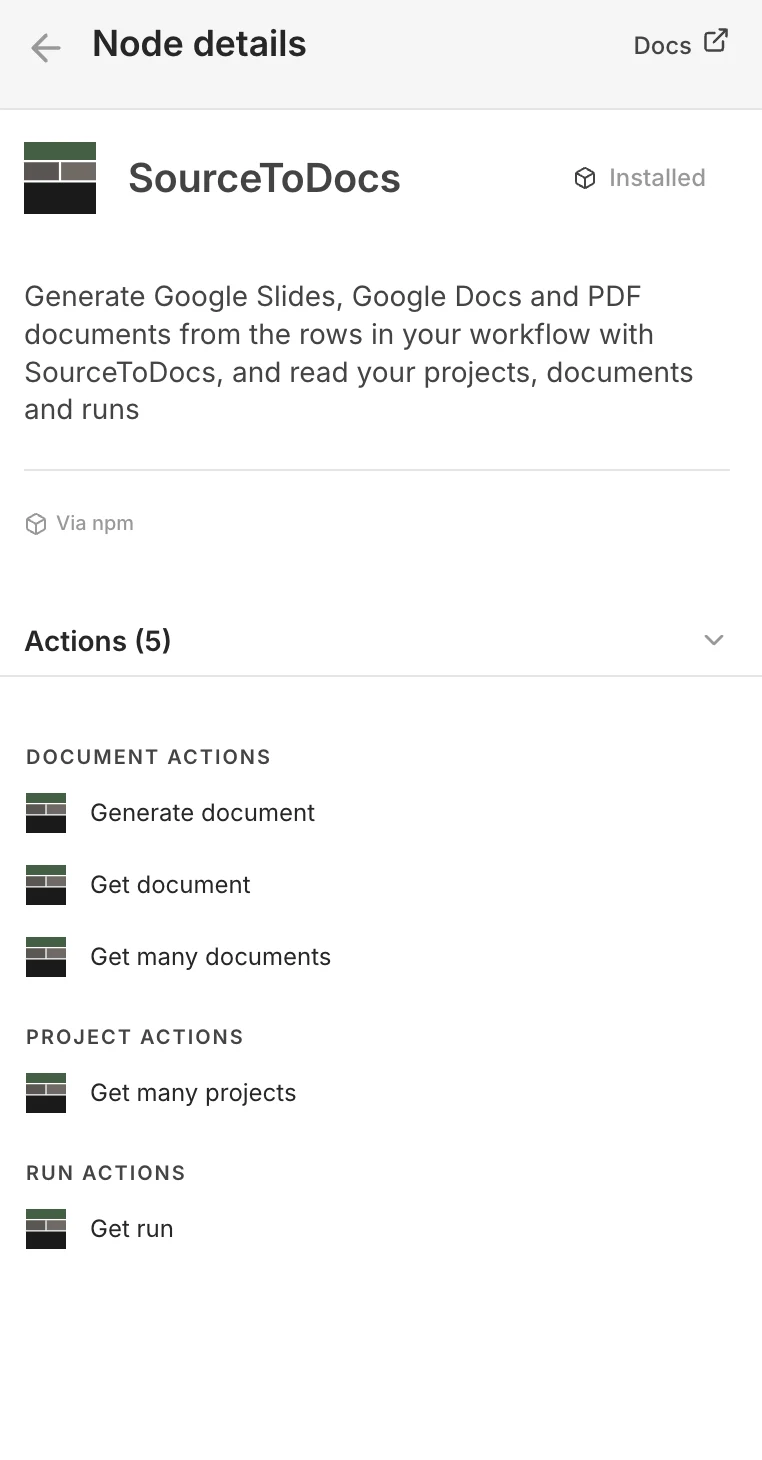
The node has five actions, grouped the way n8n groups everything: by the thing they act on.
| Resource | Action | Use it to |
|---|---|---|
| Document | Generate document | Start a generation run and, optionally, wait for the files |
| Document | Get document | Read one document’s setup |
| Document | Get many documents | List the documents in a project |
| Project | Get many projects | List the projects in your workspace |
| Run | Get run | Check a run started earlier, by its ID |
Generate is where nearly all the work happens. You point it at a project and a document, which is the template plus its setup in SourceToDocs, and tell it where the rows come from.
Two ways to feed it rows
The setting that matters most is Rows Come From. It decides whether n8n supplies the data or just pulls the trigger.
Connected data sources
This workflow
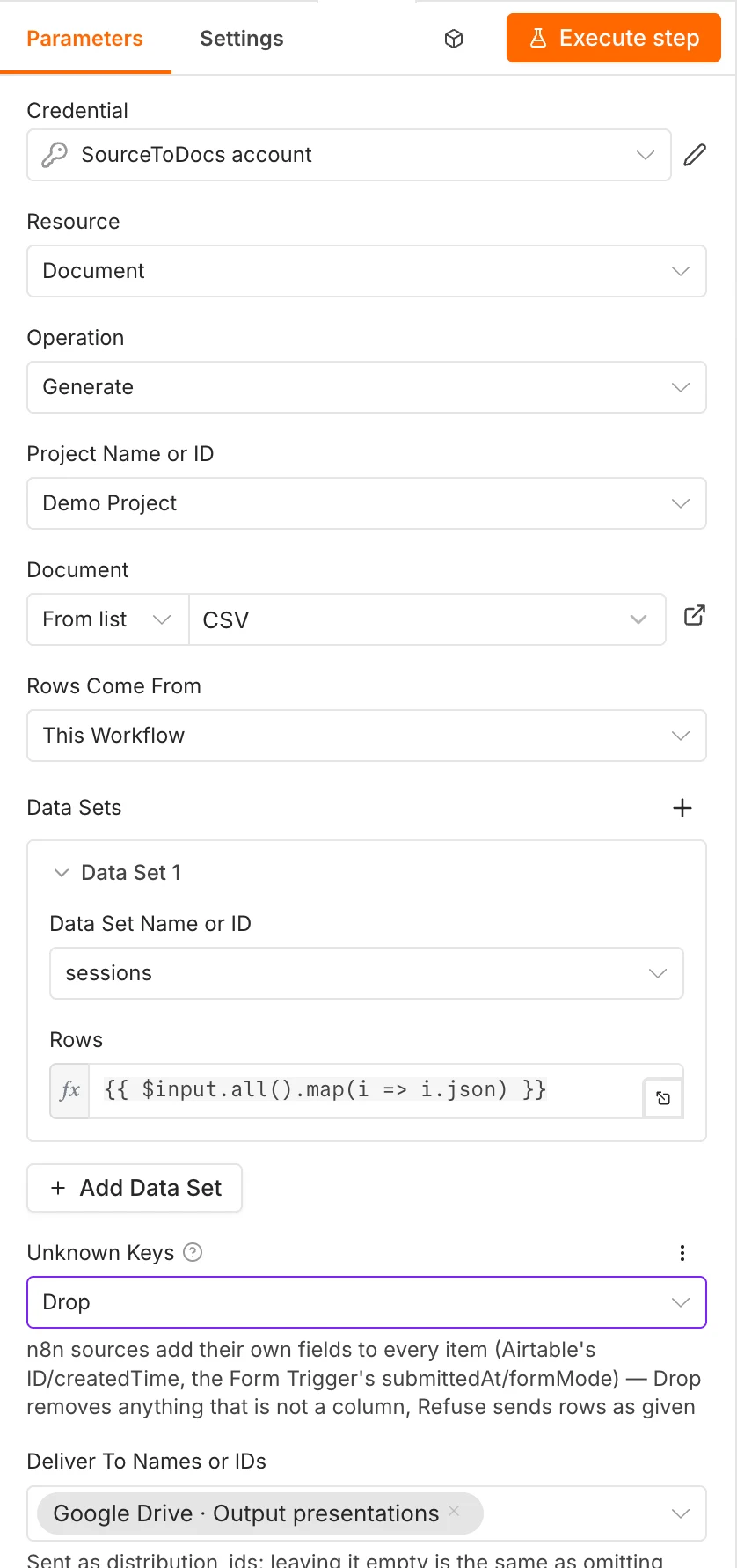
Connected data sources. The project already reads from Airtable, Google Sheets or another connected source. n8n only decides when to generate: on a schedule, when a record changes, when someone submits a form. This is the simplest setup and the one to choose when the data already lives in a table SourceToDocs can read.
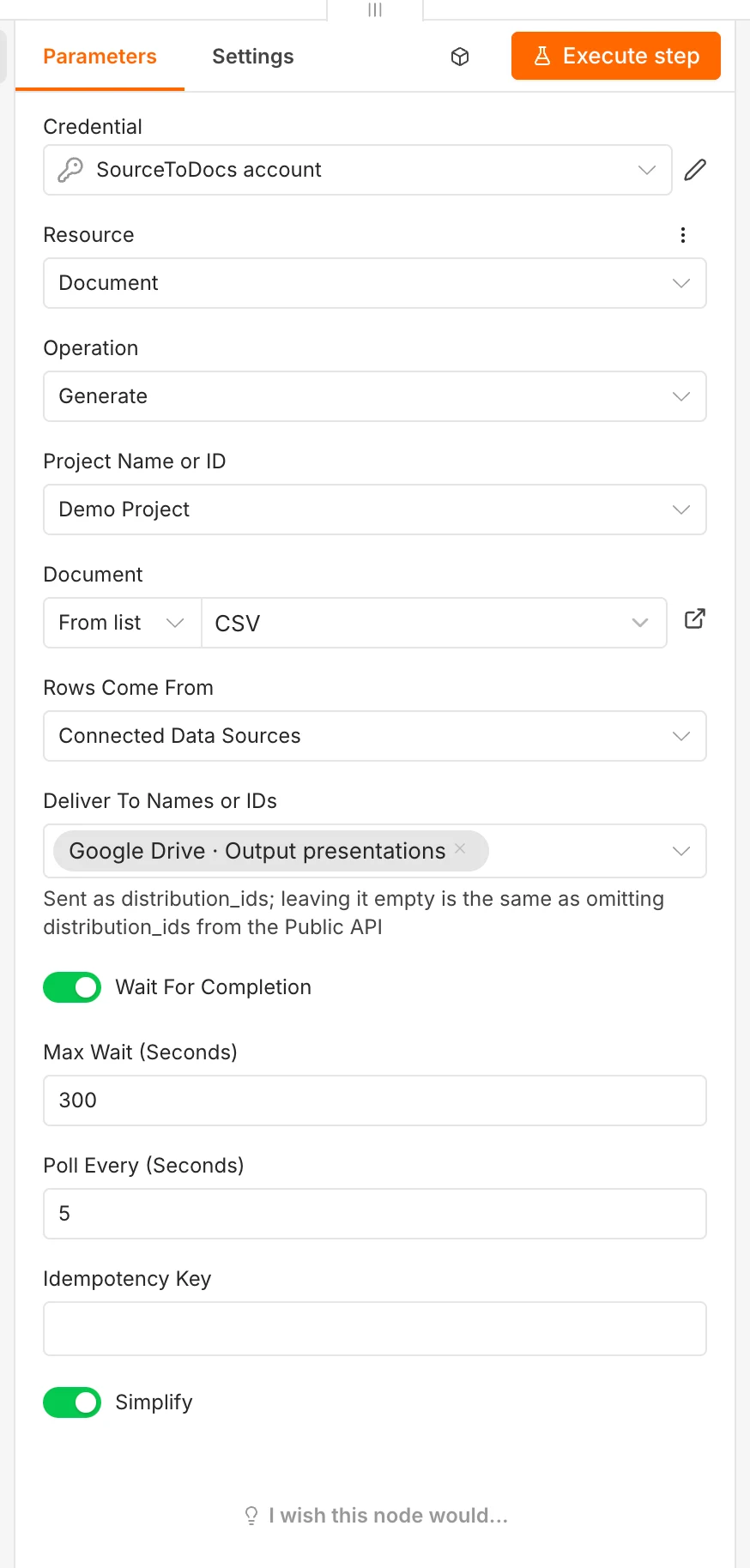
This workflow. The rows come from earlier n8n nodes instead. Each data set in the document gets its rows from an expression, and the usual one hands over every incoming item:
{{ $input.all().map(i => i.json) }}Use this when the data doesn’t sit in one table: a webhook payload, a merged result from two APIs, a database query, or text an AI step just wrote. A document with several data sets gets one entry per set, so a deck can take its sessions from one node and its speakers from another.
n8n tends to add its own fields to every item, such as Airtable’s record ID and created time, or the Form Trigger’s submission time. Unknown Keys decides what happens to them. Drop strips anything that isn’t a column in the data set. Refuse sends the rows exactly as given, without stripping anything.
Set it up
- 01
Install the node
Open the nodes panel, search for SourceToDocs and click Install. The node is verified by n8n, so this works on n8n Cloud and on self-hosted instances. On self-hosted you can also install the npm package @twovmodules/n8n-nodes-sourcetodocs from Settings, then Community nodes.
- 02
Add your credential
Create a SourceToDocs account credential with an API token from your workspace. Every run the node starts is tied to that token.
- 03
Pick the project and document
Both are dropdowns that load from your workspace, so you choose the template by name rather than pasting IDs.
- 04
Choose where rows come from
Connected data sources, or this workflow with one row expression per data set.
- 05
Choose delivery and waiting
Select one or more Deliver To destinations, such as a Google Drive folder, and decide whether the workflow waits for the files.
The template itself is built in SourceToDocs, not in n8n. That separation is deliberate: a designer keeps editing the Google Slides or Docs master, and the n8n workflow never has to change when the layout does.
Waiting, retries and output
Generation is asynchronous: a short deck takes seconds, a long document with many repeated sections takes longer. The node gives you both ways of dealing with that.
- Wait For Completion on. The node polls the run and only hands control to the next node once the files exist. You set how often it checks and how long it waits; the screenshots above check every 5 seconds for up to 300. Use this when the next step needs the files, for example to email a link or post it to Slack.
- Wait For Completion off. The node returns as soon as the run has started. Save the run ID and check it later with Get run. Use this for big batches that would outlast the wait.
- Idempotency Key. Set it to something unique to the request, such as an order or submission ID. If n8n retries the execution after a failure, the same key will not produce a second set of documents.
- Simplify. When on, the node returns a compact result that is easier to map into the next node. Switch it off when you need the full run record.
Workflows teams build with it
The pattern is always the same: n8n catches the event and gathers the data, SourceToDocs produces the document. What changes is the trigger.
| Workflow | Trigger | Rows come from | Output |
|---|---|---|---|
| Proposal generator | Form Trigger or a CRM deal stage | This workflow: the form or deal fields | Branded proposal deck plus a PDF for the client |
| Monthly client reports | Schedule Trigger on the first of the month | This workflow: a database or analytics query per client | One report per client, each in its own Drive folder |
| Airtable to Google Slides | Airtable record update | Connected data source | A deck per record, regenerated when the record changes |
| Event programme | Form with an internal or public option | Connected data source, filtered per version | Programme deck and PDF for the team, a public cut for attendees |
| AI-drafted documents | Any trigger, then an AI step that writes the copy | This workflow: the AI node’s output as rows | The generated text laid into the branded template |
The last row is worth a note. Asking an AI model to produce a whole deck gets you a deck that looks like the model’s idea of a deck. Asking it to write the words, then handing those words to a template, gets you your own layout every time. That split is the reason this node exists. 2V Automation, an n8n agency, describes the same pattern from their side: n8n for the plumbing, SourceToDocs for the document step.
Honest limits
- The template lives in SourceToDocs. You can’t design or edit the layout from inside n8n. That is by design, but it means a new document type starts in the SourceToDocs app, not the workflow canvas.
- Waiting has a ceiling. A run can take longer than Max Wait. The run itself carries on in SourceToDocs, so for very large batches turn waiting off and check on it with Get run.
- Rows must match the data set. The node maps items to the columns you defined in SourceToDocs. Fields with no matching column are dropped or refused; they are never invented into the document.
FAQ
Can n8n generate Google Slides from a template?
Not well on its own. The built-in Google Slides node replaces text in an existing presentation, so you copy a deck and fill placeholders one by one, and repeating a slide per row needs raw API calls. The SourceToDocs node generates the full deck from your template in one step, including slides that repeat for every row.
Can n8n create PDFs?
Yes. Switch on Also generate PDF on the document and each single run delivers a PDF next to the Google Slides deck or Google Doc, so you don’t need an HTML-to-PDF service or a separate export step. Split runs (one file per customer) deliver the Google files only for now. See output formats.
Does my data have to be in SourceToDocs?
No. Set Rows Come From to This workflow and the rows come straight from your n8n items. Use Connected data sources only when the data already sits in a source the project reads, such as an Airtable base.
What happens if n8n retries a failed execution?
Set an Idempotency Key that is unique to the request. A retry with the same key won’t generate the documents a second time.
Do I still need the API?
Not for n8n. The node uses the same public API under the hood, so anything you’d do with an HTTP Request node is available as a configured step. The API is for the systems that aren’t n8n.